

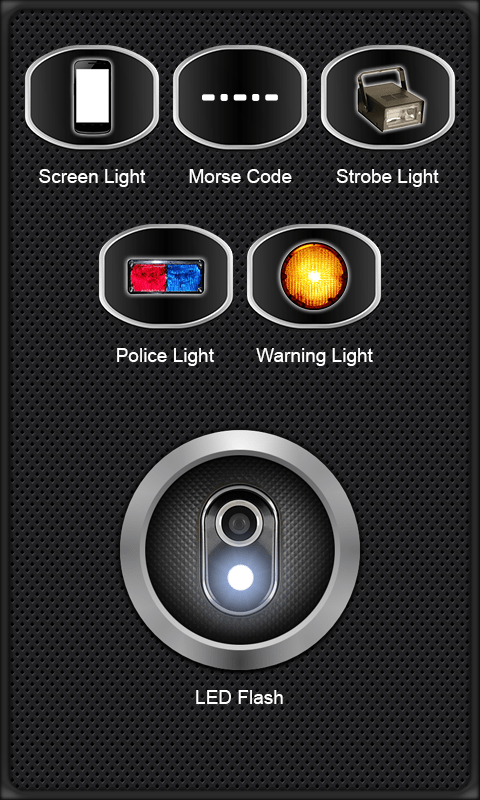
Free Flashlight App for Android Phones and Tablets
Turn your Android phone or tablet into a bright light in seconds. Flashlight App is free, starts fast, stays bright, and never asks for signups, trackers, or extra permissions.
Choose the LED flashlight, full-screen light, or strobe effects like Morse SOS, police, and warning lights. Tap the switch button at the top to use your screen instead of the LED. The battery bar stays on the screen so you see how much power is left.
- One tap turns on a steady, bright LED light
- Screen light mode uses the display as a torch any time you want softer light
- Morse SOS, strobe, and warning flashes for emergencies
- Simple controls with no account or tracking
Use it for night walks, power cuts, or travel. The controls are quick and easy to see.
People also ask
Is Flashlight App safe to install?
Yes. The app does not ask for camera access and keeps your data private while it gives bright light.
Does Flashlight App work if my phone or tablet has no LED flash?
Yes. Tap the switch button to use your display as the light, so it still works without an LED.
How do I turn my Android phone or tablet into a flashlight quickly?
Install Flashlight App, open it, and tap the button for light. It is free, opens fast even offline, and keeps the main buttons easy to reach.
What modes does Flashlight App include?
You can choose LED, screen light, or strobe modes like SOS, police, and warning flashes.
Can I use Flashlight App during emergencies?
Yes. Use Morse code SOS, Strobe Light, Police Light, or Warning Light to get quick attention. If flashing lights bother anyone, switch to Screen Light instead.